
Error Resolutions Guide
Click on any item in the menu below to jump to the respective section:
- Unapproved Convo Ad Sender
- Campaign Group Created with an Objective
- User Currently Connected Lacks Permissions
- Exceeded Quota
- Ad Account Disabled
- Ad Creative Aspect Ratio Violation
- LinkedIn Carousel Ads Failure
- Duplicate Targeting Criteria
- Exceeding Maximum Job Titles in Native Audiences
- Privacy Policy Error on Google Search
- Meta Beneficiary
- Member Groups combined with EU Countries
Unapproved Convo Ad Sender
Description: The Convo Ad Sender you're attempting to use may not have granted the necessary permissions.
Resolution: Ensure that all permissions are correctly configured for the sender. Double-check the sender settings.
Campaign Group Created with an Objective
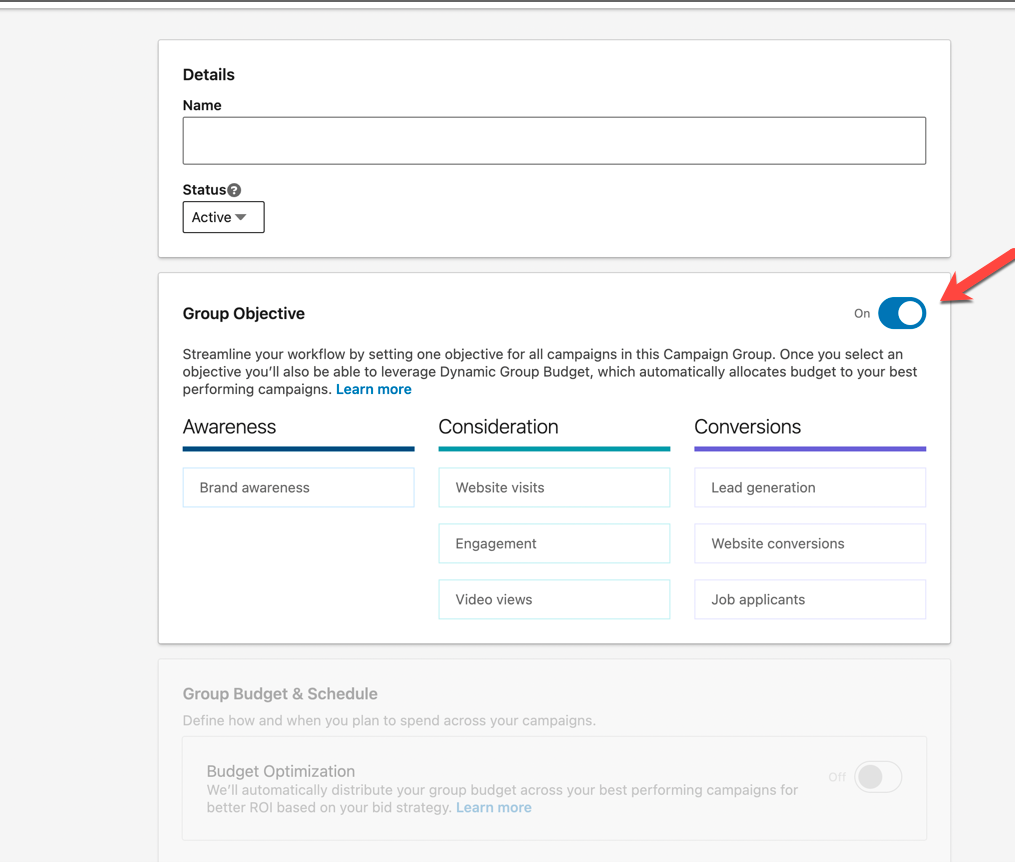
Description: This error occurs when you create a campaign group natively on LinkedIn with an active group objective.
Resolution: Navigate to your LinkedIn Campaign Manager and edit the associated Campaign group to turn off the active objective. Note LinkedIn won't allow adjusting this once it is turned ON so you will need to create a new Campaign Group and re-connect with the newly created Campaign Group.
User Currently Connected Lacks Permissions
Description: This error typically arises when a connected user lacks the necessary permissions. For example, if the person no longer works there or has changed their password.
Resolution:Reconnect the channels with a user who possesses the required permissions.
Exceeded Quota
Description: This error happens when the connected Campaign Group with LinkedIn has reached the limit of how many campaigns can be lauched to it. The limit is 2000 campaigns.
Resolution: Re-create a new Campaign Group natively in LinkedIn with the objective turned OFF. After creating the new group disconnect and reconnect the LinkedIn Integration and choose this newly created campaign group.
Ad Account Disabled
Description: Your ad account may be disabled, and the business manager may need to request a manual review.
Resolution: Log in to your Ad Account and follow the steps to remove the block. If you need further assistance, reach out to our support team via support@metadata.io
Ad Creative Aspect Ratio Violation
Description: The aspect ratio of the video does not comply with LinkedIn's policy.
Resolution: Adjust the video's aspect ratio to meet the requirements.
Note: This also applies to other channels, as each channel has its own requirements for the Ad creative, see here for each channel's requirements.
Meta Beneficiary
Description: Meta requires that businesses advertising in certain regions declare a "beneficiary" company, ensuring compliance with local laws and regulations.
Resolution: Check this guide: https://metadatasupport.zendesk.com/hc/en-us/articles/19145817230228-Add-Beneficiary-for-Meta-Instagram
Privacy Policy Error on Google Search
Description: The ad might be declined due to policy violations, including prohibited topics in the policy summary. Check to also make sure there are no invalid characters that have been added to the Ad, any invalid characters may cause the Ad to be declined.
Resolution: See Google's advertising recommendations.
Member Groups combined with EU Countries
Description: When trying to use Member Groups with EU countries the campaign may fail. LinkedIn currently does not allow this.
Resolution: Relaunch the campaign without Member groups with EU countries.
Comments
0 comments
Article is closed for comments.